Live inventory and availability
Show accurate stock, warehouse availability, lead times, substitutes and backorder information.
Explore inventory integrationConnect customers, ecommerce, QuickOrder, AI advisors, inventory, pricing, orders, warehouse operations and shipping without replacing the ERP your company already depends on.
ERP ecommerce integration creates a secure, automated connection between your online customer experience and the operational systems that control products, customers, inventory, contract pricing, orders, purchasing, manufacturing, shipping and accounting.
Instead of copying information between systems, ecommerce requests the correct data when it is needed and sends completed transactions back to the ERP using carefully controlled business rules.
Starweb Designs connects business systems to practical ecommerce tools your customers and staff can use every day.
Show accurate stock, warehouse availability, lead times, substitutes and backorder information.
Explore inventory integrationDisplay contract pricing, account rules, volume breaks, discounts and customer-specific catalogs.
Explore customer pricingEnter part numbers, upload CSV files, show live price and availability, and build large orders quickly.
See QuickOrder featuresAssign different PO numbers to products in one session and keep each group organized throughout checkout.
See multi-PO orderingCreate multiple BOMs instantly, organize them by purchase order and reuse them for future projects.
Explore BOM workflowsAnswer product questions, locate technical information, open the correct PDF and guide users to compatible products.
Explore AI advisorsOpen a technical manual, identify a part and send it directly into a sliding QuickOrder panel without leaving the document.
Explore PDF orderingGive customers access to orders, invoices, tracking, backorders, machines, saved BOMs and account activity.
Explore customer portalsTransform ERP and ecommerce data into live management visibility, alerts, trends and actionable intelligence.
Explore business dashboardsQuickOrder is more than a part-number entry box. It becomes a connected ordering workspace powered by ERP pricing, inventory, account rules and saved customer data.
Bulk CSV import Upload hundreds of lines and validate the order instantly.
Multiple PO numbers Group products by purchase order in one ordering session.
Instant BOM creation Save one or multiple bills of materials directly from the order.
Live pricing and availability Return customer-specific data before checkout.
The AI advisor can identify the product or part being discussed, retrieve the correct manual or technical sheet, answer from approved source data, and guide the customer into the next action.
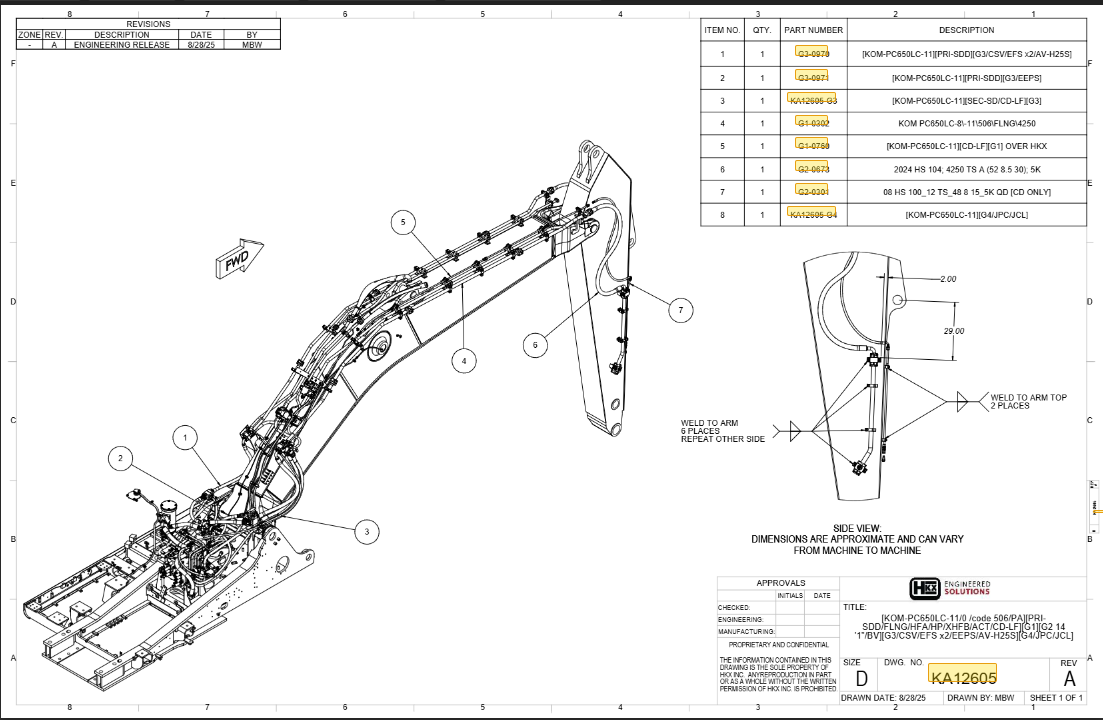
Convert product manuals, exploded diagrams, catalogs and technical sheets into interactive ordering tools.
The objective is not integration for integration’s sake. The objective is a measurable improvement in customer service and operational performance.
Reduce manual entry and push validated orders into the ERP using approved rules.
Give customers dependable account data before they commit to an order.
Combine portals, documents, AI advisors and order history in one experience.
Use dashboards and alerts to reveal issues before they become expensive problems.
Every manufacturer and distributor has different pricing rules, order requirements, approval steps, warehouses, product relationships and ERP limitations. The integration should adapt to those realities.
Starweb Designs can connect through APIs, database views, scheduled files, EDI, secure middleware, web services or controlled custom processes, depending on the capabilities of your ERP and infrastructure.
Complex integrations become manageable when discovery, data validation, development and rollout are handled in controlled phases. Use the ERP ecommerce integration checklist →
Map systems, users, data ownership, workflows, rules and business priorities.
Define product, customer, pricing, inventory, order and fulfillment exchanges.
Prove the most important workflow with representative ERP and ecommerce data.
Build integration services, validation, monitoring, dashboards and recovery controls.
Test business rules, edge cases, performance, security and failure handling.
Launch in phases, train users, monitor activity and continue improving workflows.
See how connected ecommerce and ERP workflows bring together ordering, live pricing and availability, automation, customer tools and scalable business operations across two focused videos.
Watch the complete ecommerce-to-ERP workflow.
Part 2: Automate workflows and scale your business.
These answers introduce the most common technical and business questions. We can expand this section as the content cluster grows.
ERP ecommerce integration connects an ecommerce platform with the ERP data and workflows that manage products, customers, pricing, inventory, orders, purchasing, fulfillment and accounting.
Yes. Availability can be requested in real time or synchronized at controlled intervals, depending on ERP capabilities, traffic volume and business requirements.
Yes. Logged-in customers can be matched to ERP account records so the ecommerce platform displays customer-specific prices, discounts, catalogs and rules.
Yes. A QuickOrder workflow can validate part numbers, quantities, account rules, pricing and availability before the order is submitted.
Yes. Products can be grouped by PO number and kept organized throughout the cart, checkout, database and ERP order workflow.
Yes. BOMs can be created from QuickOrder lines, purchase-order groups, carts, machines, projects or previous orders and then reused later.
Yes. Product and part references inside technical documents can launch QuickOrder, retrieve ERP pricing and inventory, and add selected items without forcing the user to leave the document workflow.
The advisor first identifies the current product or part, retrieves the correct associated manual or technical sheet, answers from approved content and can open the source document for verification.
No. A well-designed integration works around the ERP your business already uses and extends its data into a modern ecommerce and customer-service experience.
Potential systems include IFS, Infor Syteline, Epicor, NetSuite, Microsoft Dynamics, SAP, Oracle, AmberPOS and other platforms that provide usable APIs, databases, exports, EDI or integration interfaces.
Timing depends on system access, data quality, workflow complexity and project scope. A focused prototype may take weeks, while a complete enterprise rollout is normally delivered in phases over several months.
Production integrations should include logging, retries, alerts, dashboards, reconciliation tools and clear recovery procedures so issues can be identified and corrected quickly.
Let’s map the workflows your customers and staff struggle with today and design an ecommerce integration that removes the bottlenecks.