

A successful integration starts by defining how the business should work before connecting any systems.
ERP ecommerce integration is not simply a connector between two databases. It is a controlled operating workflow that decides where information comes from, when it moves, which business rules apply, and what happens when a transaction cannot be completed.
Use this checklist before development begins, during technical discovery, and again before launch. For a broader look at the customer and operational capabilities involved, explore our ERP ecommerce integration services.
Start with ownership, rules and exceptions
The first integration decision is not which API to use. It is which system owns each piece of information and which rules must be preserved when data crosses between systems.
Data ownership
Identify the source of truth for products, customers, pricing, inventory, orders, fulfillment and accounting status.
Business rules
Document contract pricing, account restrictions, warehouses, approvals, substitutions, taxes and purchasing requirements.
Exceptions
Define what should happen when a part is missing, inventory changes, an account is on hold or an order fails validation.
1. Define the system of record for every data group
A field should not be freely editable in multiple systems without a conflict strategy. Decide who owns it, who can read it, who can update it and how quickly changes must appear elsewhere.
Part numbers, operational status, costs, account terms, warehouse balances, orders, invoices and fulfillment records.
Navigation, merchandising copy, landing-page content, search settings, customer-facing media and campaign presentation.
Customer profiles, addresses, quotes, saved lists and preferences that may need controlled two-way synchronization.
Descriptions, specifications, compatibility, manuals and images that may belong in a PIM or ecommerce content layer.
Do not make every field real time by default
Real-time communication is valuable when a customer decision depends on the latest answer. It also creates more operational dependency between systems. Choose real time where it protects accuracy or customer experience, and use scheduled synchronization where a short delay is acceptable.
2. Map the customer-facing data flows
The integration should support the complete buying and service journey, not only the moment an order is submitted.
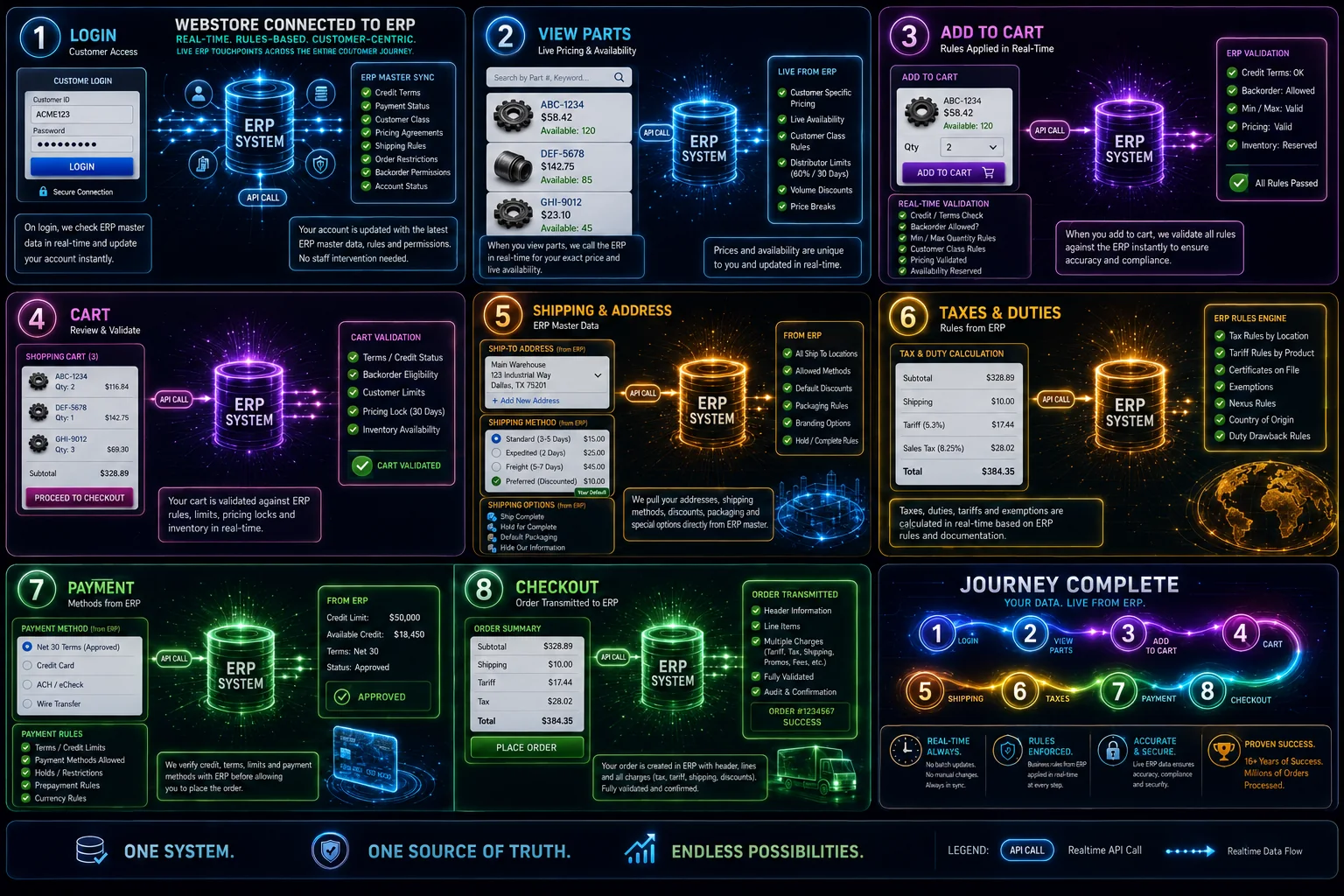
Catalog and product status
Map SKUs, descriptions, units, categories, substitutions, documents, restrictions and sellable status.
Availability and warehouses
Define on-hand, available-to-promise, lead times, backorders, warehouse visibility and inventory reservations.
Customer-specific prices
Account for contracts, quantity breaks, promotions, currencies, taxes, freight rules and quote-only items.
Accounts and permissions
Map account numbers, contacts, ship-to locations, terms, credit status, purchasing roles and approval limits.
Checkout and purchasing
Define purchase orders, multiple PO groups, BOMs, notes, payment methods, validation and order acknowledgements.
Fulfillment and account history
Return order status, shipments, tracking, invoices, backorders, RMAs and customer-service information.
3. Choose the right synchronization method
Most production integrations use more than one communication pattern. The correct mix depends on ERP capability, transaction volume, customer expectations and the risk created by stale information.
Best for answers required during the customer session, such as contract pricing, availability or account validation.
Useful when one system should notify another immediately after an order, shipment or status change.
Appropriate for larger catalogs, documents, reporting data and updates that can tolerate a controlled delay.
Practical when direct APIs are limited or when existing partners and workflows already rely on governed exchanges.
4. Design failure handling before launch
An integration is not production-ready until the team can see failures, understand their cause and recover without losing or duplicating transactions.
- Give every important transaction a traceable identifier.
- Preserve the original request and response needed for investigation.
- Retry only operations that are safe to repeat.
- Prevent duplicate customers, orders, payments and shipment updates.
- Alert the correct team when automated recovery is not possible.
- Provide a reconciliation view for ecommerce and ERP records.
- Document the manual recovery procedure and responsible owner.
ERP ecommerce launch checklist
Before launch, confirm that the business and technical teams can answer yes to each item:
- Every data group has a documented source of truth.
- Required fields, formats and validation rules are defined.
- Customer-specific pricing and account restrictions are tested.
- Inventory behavior is clear for multiple warehouses, backorders and lead times.
- Orders cannot be lost or duplicated during retries.
- Staff can identify and resolve failed transactions.
- Security, permissions and sensitive customer data have been reviewed.
- Performance has been tested with realistic catalog and order volume.
- Finance, sales, service, warehouse and ecommerce teams have completed acceptance testing.
- The rollout, rollback, support and post-launch monitoring plans are documented.
Related services and resources
A dependable ERP connection often touches ecommerce experience, internal automation and partner data workflows at the same time.
Frequently asked questions
What should be included in an ERP ecommerce integration plan?
The plan should define system ownership, product and customer data, inventory and pricing rules, order workflows, fulfillment updates, security, monitoring, retries, testing and rollout responsibilities.
Does every ERP ecommerce field need to sync in real time?
No. Inventory, pricing and critical order events may need real-time communication, while catalogs, documents, reports and lower-priority data may use scheduled synchronization.
Which system should own ecommerce product data?
Ownership depends on the business. The ERP may own operational fields such as part numbers and costs, while a PIM or ecommerce platform may own enriched descriptions, images, documents and merchandising content.
How should ERP integration failures be handled?
Production integrations should log failures, preserve the original transaction, retry safe operations, alert the correct team and provide a clear reconciliation and recovery process.
Ready to plan your ERP ecommerce workflow?
See how Starweb Designs connects ecommerce experiences with the pricing, inventory, customer and order systems that run the business.